개요
일하던중 npm install 시 어떻게 프로젝트의 node_modules 아래에 패키지형태로 설치되는지 그 과정이 궁금하여 찾아보았다. 전체프로세스 파악 및 코드레벨에서 살펴보고자함.
메모
전체 프로세스
프로세스 도식
graph TD
    A[npm install 실행] --> B[package.json 분석]
    B --> C[의존성 트리 구성]
    C --> D[패키지 메타데이터 조회]
    D --> E{캐시 확인}
    E -->|캐시 있음| G[캐시에서 로드]
    E -->|캐시 없음| F[원격 저장소에서 다운로드]
    F --> H[캐시에 저장]
    G --> I[무결성 검증]
    H --> I
    I --> J[node_modules에 압축해제]
캐시폴더 구조 (windows)
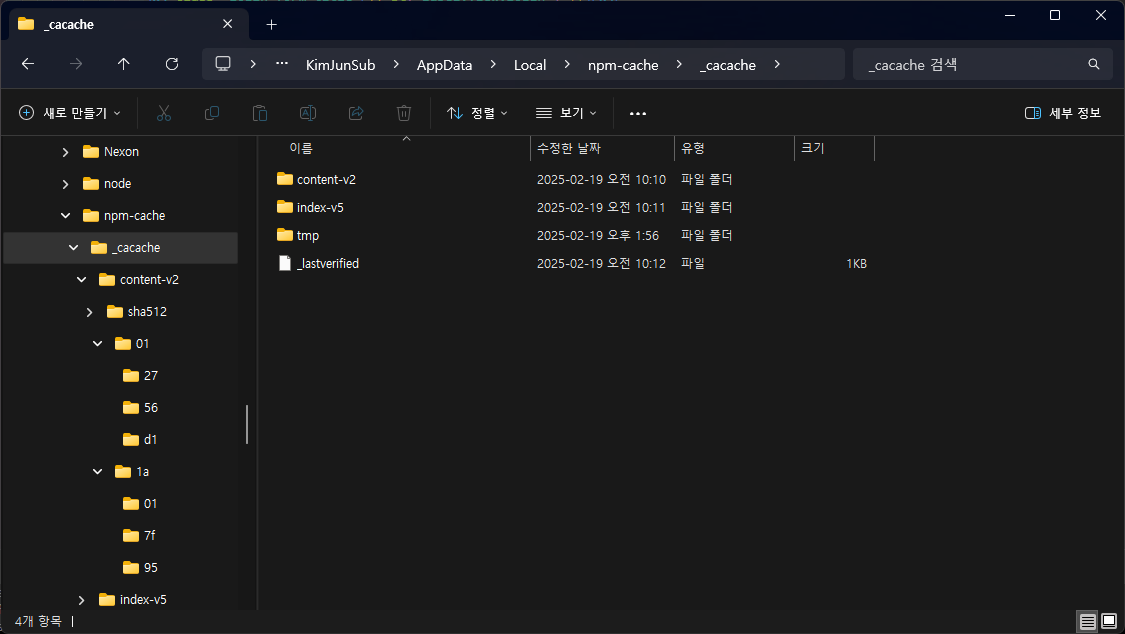
_cacache/ ├── content-v2/ │ └── sha512/ # 실제 패키지 컨텐츠 (해시로 저장) ├── index-v5/ # 메타데이터 인덱스 └── tmp/ # 임시 파일들
전체 코드
// 1. npm CLI 진입점 (npm/cli/lib/commands/install.js)
class Install extends ArboristWorkspaceCmd {
  async exec(args) {
    const arb = new Arborist(opts)
    await arb.reify(opts)  // 실제 설치 시작
  }
}

// 2. 의존성 분석 (@npmcli/arborist)
class Arborist {
  async reify(options) {
    // 의존성 트리 구성
    const tree = await this.buildIdealTree(options)

    // 각 패키지 설치
    for (const node of tree.target.values()) {
      await this.fetchNode(node)
    }
  }
}

// 3. 패키지 다운로드 (npm/pacote)
async function fetch(spec, options) {
  // 메타데이터 조회
  const manifest = await this.manifest(spec, options)

  // tarball URL 획득
  const tarballUrl = manifest._resolved

  // 다운로드 및 캐시 저장
  const integrity = manifest._integrity
  await this.tarball(tarballUrl, options)
}

// 4. 캐시 처리 (npm/cacache)
const cacache = {
  async put(cachePath, key, data, opts) {
    // 해시 계산
    const integrity = ssri.fromData(data)

    // 캐시 저장
    await writeFile(contentPath(cachePath, integrity), data)

    // 인덱스 업데이트
    await index.insert(cachePath, key, integrity)
  },

  async get(cachePath, key) {
    // 캐시 조회
    const info = await index.find(cachePath, key)

    // 데이터 읽기
    const data = await readFile(contentPath(cachePath, info.integrity))

    return { data, integrity: info.integrity }
  }
}

// 5. 압축 해제 (npm/pacote/extract)
async function extract(spec, dest, opts) {
  // 캐시에서 데이터 로드
  const { data, integrity } = await cacache.get(opts.cache, key)

  // 무결성 검증
  if (!ssri.checkData(data, integrity)) {
    throw new Error('Invalid data')
  }

  // node_modules에 압축 해제
  await tar.x({
    cwd: dest,
    file: data,
    strip: 1,
    ...opts
  })
}
모듈 소스
캐시저장
// cacache의 내부 동작
const cacache = require('cacache')

// 1. 패키지 컨텐츠를 캐시에 저장
await cacache.put(cachePath, key, tarballData, {
  algorithms: ['sha512']  // SHA-512 해시 사용
})

// 2. 캐시에서 컨텐츠 읽기
const { data, integrity } = await cacache.get(cachePath, key)
파일 읽기 (이진파일)
// lib/content/read.js
const readFile = async (cachePath, integrity) => {
  // 1. 해시값으로 파일 경로 생성
  const path = contentPath(cachePath, integrity)

  // 2. 바이너리 데이터로 읽기
  const data = await fs.readFile(path)

  // 3. 무결성 검증
  if (ssri.checkData(data, integrity)) {
    return data  // 원본 tar.gz 바이너리 반환
  }
}
압축 해제
// lib/extract.js
const extract = async (spec, dest, opts) => {
  // 1. 캐시에서 바이너리 데이터 읽기
  const { data } = await cacache.get(cachePath, key)

  // 2. 메모리상에서 tar 스트림 생성
  const stream = new tar.Parse()

  // 3. node_modules에 압축 해제
  await tar.x({
    cwd: dest,
    file: data, // 바이너리 데이터를 직접 전달
    strip: 1,   // package 디렉토리 제거
    ...opts
  })
}